Every failing test.
The exact line.
Larvyn runs php artisan test and shows every test grouped by class. Failures come with the message, the trace and the line in your code, not in vendor/.
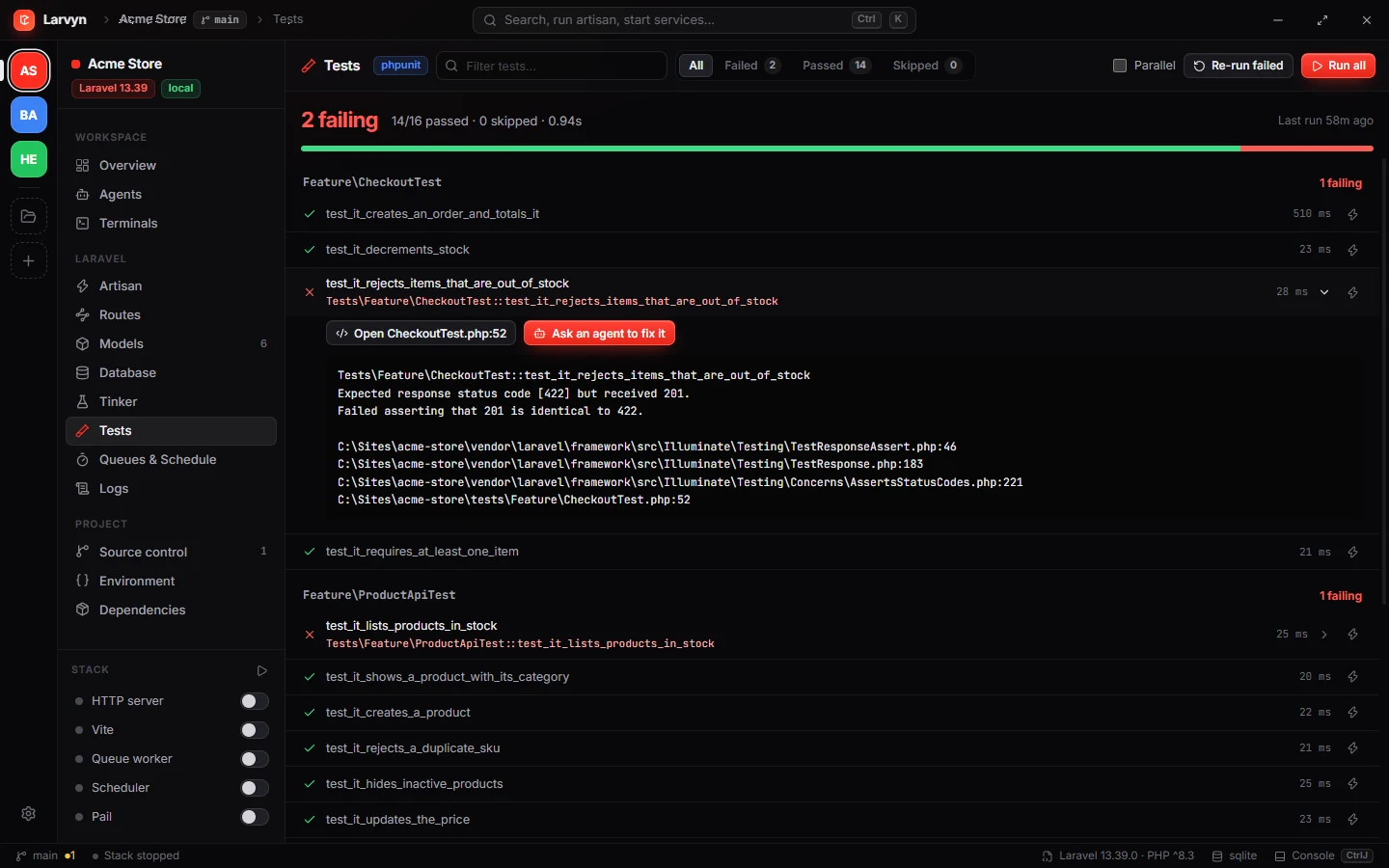
Less scrolling through terminal output.
Re-run what failed
Run only the failures, a single test, or the suite with filters and in parallel.
Open the failing line
One click opens the file at the line in VS Code, Cursor, PhpStorm, Zed, Windsurf, Sublime or Neovim.
Ask an agent to fix it
The failure and its trace go with the prompt, to Claude Code, Codex or any agent you use.
Questions
Does it work with Pest and PHPUnit?
Yes. Larvyn runs php artisan test, so it uses whatever your project is set up with, Pest or PHPUnit, including parallel runs.
Do I need to configure anything?
No. Add the project folder and the Tests view is ready. Larvyn uses the PHP and Composer on your PATH, or Herd’s.
Can an agent fix a failing test?
Yes. Ask an agent sends the failure, its message and the trace with the prompt. With worktrees on, the agent works on its own branch and you review the diff.
Which editors can open the failing line?
VS Code, Cursor, PhpStorm, Zed, Windsurf, Sublime Text and Neovim.
More of Larvyn

Go from red to green faster.
Larvyn is free, with no account. Install it with one command and add a folder.